트와인 페이지

트와인 위키
할로위 위키
트와인 작업 내용을 저장하고 나중에 불러오는 방법
트와인 툴을 활용하여 프로젝트를 진행하다보면 작업 내용이 사라져서 처음부터 다시 작업을 해야할 수 있다.
작업이 끝날 때마다 트와인 작업 내용을 저장하고 혹시 문제가 생기면 다시 불러와서 작업하면 도움이 된다.
 저장 방법&배포 방법
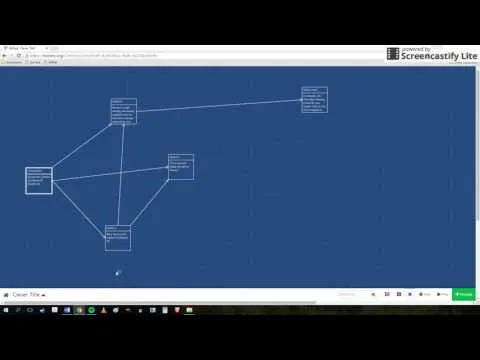
일반적으로는 크롬 브라우저를 사용할 때 구글 계정으로 로그인해서 트와인을 사용하면 트와인 스토리가 그대로 남아있다. 하지만 다른 컴퓨터를 사용하거나 다른 문제 등으로 작업 내용이 사라질 수 있으니 주의가 필요하다.
온라인 상에 배포하여 자신의 작품을 다른 사람들이 언제든지 감상할 수 있게도 할 수 있다. itch.io 사이트에 가입을 해서 트와인에서 publish한 파일을 업로드하면 온라인 게시가 가능하다.
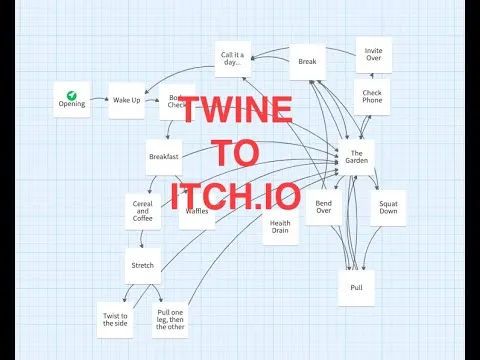
 프로젝트 게시판에 업로드 방법

1. 저장 방법&배포 방법에 있는 동영상을 참고해서 publish to file 메뉴를 클릭한 후, 본인의 컴퓨터에 html 파일을 저장하기
2. 위에 있는 코딩 동아리 프로젝트 게시판에 접속한 후, + 버튼을 누르고 '작품명(학번_이름)' 형태로 제목란에 적기
3.트와인 사이트에서 다운로드한 본인의 프로젝트 파일(html)을 업로드 하기
주의 사항: 트와인 프로젝트 작업할 때 이미지, 영상, 사운드 등의 파일은 반드시 온라인 상에 있는 것을 링크 형태로 가져오기
프로젝트 작품에는 반드시 변수를 활용하고, 조건문(if)을 적용하기
간단한 사용 방법


오늘의 학습 내용
학습 내용
스토리 포맷은 트와인 기본 포맷인 Harlowe를 사용하자.
나중에 실력이 업그레이드 되면 그 때 다른 포맷 사용 추천
1. 연결
[[연결할 paragraph]]
[[원하는 paragraph 이름->실재 paragraph 이름]] 링크를 우회해서 다른 이름으로 들어가는 개념
또는
[[원하는 paragraph 이름|실재 paragraph 이름]] 링크의 이름 변경 개념
2. 변수
$변수명 = 값
일반적인 변수 선언은 $변수 이름
임시 변수 선언은 _변수 이름
Example 1.
:: StoryTitle
Setting and Showing Variables in Harlowe
:: Start
(set: $numberVariable to 5)
(set: $textVariable to "five")
(set: _textVariable to "The values")
_textVariable are $numberVariable and $textVariable.
(set: $numberVariable to it + 1)
_textVariable are $numberVariable and $textVariable.
Example 2.
(set:$name to (prompt:"Enter your name: ", "Default Name"))
Welcome, $name
$name님을 환영합니다. ^^
3. If statement
:: StoryTitle
Conditional Statements in Harlowe
:: Start
(set: $animal to "horse")
(if: $animal is "dog")[It's a dog!]
(else:)[It's a horse!]
(unless: $animal is "dog")[It's a horse!]
(else:)[It's a dog!]
(set: $isDog to $animal is "horse")
$isDog[It's a dog!]
TypeScript
복사
실습 예제

Twine Example Code
Example Code:
Quick, you need to save the Prince.
<img width="200" src="https://upload.wikimedia.org/wikipedia/commons/thumb/0/01/Le_petit_prince.png/438px-Le_petit_prince.png">
credit: wikimedia
[[Take the horse]]
[[Take the spaceship]]
Stylesheet Code:
@import url(http://fonts.googleapis.com/css?family=Lora:400,700,400italic,700italic);
body, tw-story
{
font-family: Lora, serif;
font-size: 18px;
background-color: lightblue;
}
Variables & Conditions (advanced):
(set: $life to $life-1)
(if: $life is 4)
[isn't it time to get up you sleepy head?
[[choices]] ]
(if: $life is 3)
[you missed breakfast
[[choices]] ]
(if: $life is 2)
[you missed your ride
[[choices]] ]
(if: $life is 1)
[you missed your job interview
[[restart]] ]
Add Sound (advanced):
Search for a sound on freesound
Right-click on page and select View Page Source
Search for .mp3
Highlight & copy the URL it found
Add following code to the page you want sound on and replace with sound URL you just copied
<audio src="the URL of your sound effect" autoplay>
Share Project (만든 프로젝트 배포하여 공유하기)
Open your story in twine
Select My Story
Select Publish to File
Upload file to website, padlet, etc.
TypeScript
복사
For more information
Html, Javascript, Phython 등을 배울 수 있는 사이트