Flutter란?
Dart라는 언어를 활용해서 android와 ios 앱을 동시에 개발할 수 있는 프레임워크를 의미한다. 보통 개발자 한명이 두개를 동시에 개발하려면 android의 경우 java와 kotlin을 공부해야하고 ios의 경우 object c, swift를 공부해야하는 러닝 커브가 상당히 높았다. 그리고 개발하려는 폴더를 ios, android로 둘을 나누어 버그 관리해주고 코드를 작성해야하는 일은 여간 귀찮은 일이 아닐 수 없다!!
따라서 Dart라는 언어 하나만으로 둘을 동시에 개발할 수 있는 Flutter의 경우에는 상당히 메리트가 있다.
출처:
[후니의 컴퓨터]
 작품 업로드 게시판
윈도우즈 다트 설치
맥 다트 설치
 주의사항
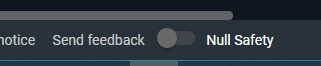
주의사항아래 그림과 같이 DartPad 명령어 실행 전에 좌측 하단의 Null Safety를 비활성화 하고 Run 버튼을 누르세요. 그렇지 않으면 에러가 발생합니다.

목차
[완성본]
실행화면(클릭)


/*
영신여자고등학교 스토리텔링 작품
작품 제목: Circle of Life
*/
String male; //남자 주인공 이름 변수
String female; //여자 주인공 이름 변수
int stone; //신비한 돌의 갯수
double money; //돈
bool isSick; //건강
void main() {
male = 'A'; //남자 주인공 이름 설정
female = 'B'; //여자 주인공 이름 설정
money = 99.01; //현재 가지고 있는 돈
isSick = true; //현재 건강 상태(좋은 경우 false, 나쁜 경우 true)
intro(); //이야기 시작
body(); //이야기 본문
conclusion(); //이야기 결론
}
void intro() {
print('$male and $female live in a faraway land.');
}
void body() {
print('$male and $female live a good life.');
if (isSick) {
print('But, $male is sick now. So $male and $female go to hospital.');
print('$male and $female go to hospital.');
print('$male and $female are getting better day by day');
} else {
if (money >= 100) {
body1();
} else {
body2();
}
}
}
void body1() {
print('$male and $female have $money원 and plan to take a trip.');
}
void body2() {
print('$male and $female plan to come up with an idea to make money.');
for (int day = 1; day < 4; day++) {
print('$day day goes by.');
}
print('Fortunately, $male and $female find a magic stone.');
stone = 1;
print('Wow! $male and $female now have $stone stone.');
money = 100.01;
body1();
}
void conclusion() {
print('$male and $female will live joyfully forever.');
}
Dart
복사
[줄거리]
실행화면(클릭)


//영신여자고등학교 스토리텔링 작품
//작품 제목: Circle of Life
String male; //남자 주인공 이름 변수(문자열을 담는 변수)
String female; //여자 주인공 이름 변수(문자열을 담는 변수)
int stone; //신비한 돌의 갯수(정수를 담는 변수)
double money; //돈(소숫점이 있는 실수를 담는 변수)
bool isSick; //건강(참과 거짓을 담는 변수)
void main() {
male = 'A'; //남자 주인공 이름 설정
female = 'B'; //여자 주인공 이름 설정
money = 99.01; //현재 가지고 있는 돈
isSick = false; //현재 건강 상태(좋은 경우 false, 나쁜 경우 true)
intro(); //이야기 시작
body(); //이야기 본문
conclusion(); //이야기 결론
}
void intro() {
print('$male and $female (1)'); //이야기의 시작
}
void body() {
print('$male and $female (2)'); //본문의 시작
if (isSick) { //isSick=true 즉 아픈 경우
print('(3)');
} else { //isSkck=false 즉 아프지 않은 경우
if (money >= 100) { //100원 이상의 돈을 가지고 있다면
body1(); //body1 스토리 진행
} else { //100원 미만의 돈을 가지고 있다면
body2(); //body2 스토리 진행
}
}
}
void body1() {
print('(4-a)'); //body1의 이야기
}
void body2() {
print('(4-b)'); //body2의 이야기
for (int day = 1; day < 4; day++) {
print('$day (4-1)'); //3일의 시간이 흐른다.
}
print('(4-b-1)'); //body2 이야기 계속
stone = 1; //신비의 돌 1개 득템
print('(4-b-2)'); //body2 이야기 계속
money = 100.01; //신비의 돌 특템 후 돈이 생김
body1(); //body1 이야기로 전환
}
void conclusion() {
print('$male and $female (5)'); //이야기 결론
}
Dart
복사
[Block1: A → B → C]
실행화면(클릭)


void main() {
A(); //A함수 호출
B(); //B함수 호출
C(); //C함수 호출
}
void A() {
print('A'); //A 출력
}
void B() {
print('B'); //B 출력
}
void C() {
print('C'); //C 출력
}
Dart
복사
[Block2: A → C → B]
실행화면(클릭)


bool judge = false; //불리언형 judge 변수에 거짓 값 대입
void main() {
A(); //A함수 호출
if (judge) { //judge변수에 참 값이 들어있다면
B(); //B함수 호출
C(); //C함수 호출
} else { //judge변수에 거짓 값이 들어있다면
C(); //C함수 호출
B(); //D함수 호출
}
}
void A() {
print('A'); //A출력
}
void B() {
print('B'); //B출력
}
void C() {
print('C'); //C출력
}
Dart
복사
[Block3: Variable(변수)]
실행화면(클릭)


String a; //문자열을 넣을 수 있는 변수 선언
int b; //정수를 넣을 수 있는 변수 선언
double c; //소숫점이 있는 실수를 넣을 수 있는 변수 선언
bool d; //참과 거짓 값을 넣을 수 있는 변수 선언
void main() {
a = '문자열'; //변수에 해당 값 대입
b = 7; //변수에 해당 값 대입
c = 1.1; //변수에 해당 값 대입
d = false; //변수에 해당 값 대입
print('$a'); //문자열 변수에 있는 값 출력
print('$b'); //정수 변수에 있는 값 출력
print('$c'); //소숫점이 있는 실수 변수에 있는 값 출력
print('$d'); //참과 거짓 값을 넣을 수 있는 변수에 있는 값 출력
}
Dart
복사
[Block4: For statement(for 구문)]
실행화면(클릭)


void main() {
for (int day = 1; day < 4; day++) { //day가 1에서 3으로 변할 때까지, 즉 3회 반복할 때까지
print('$day goes by'); //해당 문구를 출력한다.
}
print('----------------------------'); //경계선을 출력한다.
List teacherList = ["강경한 선생님", "김준오 선생님"]; //강경한 선생님과 김준오 선생님을
//teacherList라는 이름을 가진
//리스트라는 통에 넣는다.
for (String tName in teacherList) { //teacherList에서 한 개씩 꺼내서
//tName이라는 문자열을 담을 수 있는 변수에 넣는다.
//teacherList 안에 남아있는 것이 없을 때까지
//꺼내고 담는 작업을 계속한다.
print('$tName'); //tName 변수 안에 있는 값을 출력한다.
}
}
Dart
복사
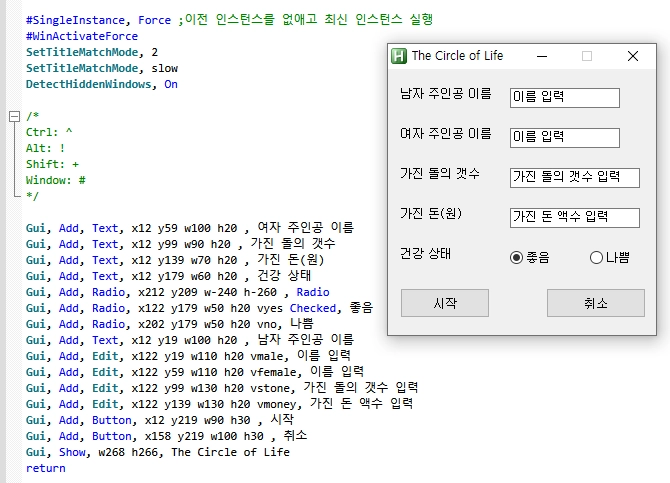
[활용] 다트 언어로 만든 코드를 Auto Hot Key 스트립트로 바꾼 예제
예전에 소개했었던 자동화 매크로 프로그램인 AutoHotKey에 여러분들이 만든 함수와 논리를 넣으면 이야기를 만드는 프로그램을 만들 수 있습니다.
 코드
코드
#SingleInstance, Force ;이전 인스턴스를 없애고 최신 인스턴스 실행
#WinActivateForce
SetTitleMatchMode, 2
SetTitleMatchMode, slow
DetectHiddenWindows, On
/*
Ctrl: ^
Alt: !
Shift: +
Window: #
*/
Gui, Add, Text, x12 y59 w100 h20 , 여자 주인공 이름
Gui, Add, Text, x12 y99 w90 h20 , 가진 돌의 갯수
Gui, Add, Text, x12 y139 w70 h20 , 가진 돈(원)
Gui, Add, Text, x12 y179 w60 h20 , 건강 상태
Gui, Add, Radio, x212 y209 w-240 h-260 , Radio
Gui, Add, Radio, x122 y179 w50 h20 vyes Checked, 좋음
Gui, Add, Radio, x202 y179 w50 h20 vno, 나쁨
Gui, Add, Text, x12 y19 w100 h20 , 남자 주인공 이름
Gui, Add, Edit, x122 y19 w110 h20 vmale, 이름 입력
Gui, Add, Edit, x122 y59 w110 h20 vfemale, 이름 입력
Gui, Add, Edit, x122 y99 w130 h20 vstone, 가진 돌의 갯수 입력
Gui, Add, Edit, x122 y139 w130 h20 vmoney, 가진 돈 액수 입력
Gui, Add, Button, x12 y219 w90 h30 , 시작
Gui, Add, Button, x158 y219 w100 h30 , 취소
Gui, Show, w268 h266, The Circle of Life
return
GuiClose:
{
ExitApp
}
return
Button시작:
{
Gui, Submit, nohide ; Gui에 있는 변수 값 가져오기
IfWinNotExist, 제목 없음 - Windows 메모장
{
Run, notepad.exe
}
else
{
WinRestore, 제목 없음 - Windows 메모장 ; 최소화되어 있는 창을 다시 살리기
WinActivate, 제목 없음 - Windows 메모장
}
Sleep, 1000
Send, ^a
Sleep, 1000
Send, {Del}
Sleep, 1000
intro(male, female, stone, money)
Sleep, 500
send, %male% and %female% live a good life.`n
if(yes = 1)
{
if (money >= 100)
{
body1(male, female, stone, money)
} else
{
body2(male, female, stone, money)
}
} else
{
send, But, %male% is sick now. So %male% and %female% go to hospital.`n
send, %male% and %female% go to hospital.`n
send, %male% and %female% are getting better day by day.`n
}
Sleep, 500
conclusion(male, female, stone, money)
}
return
/*
Send, {!}autohotkey - 나열하듯 타이핑 치듯 출력됨. 촤르륵.
Sendraw, !autohotkey - 나열하듯 타이핑 치듯 출력됨. 촤르륵.
Sendinput, {!}autohotkey - 한방에 도장 찍히듯 뙇뙇뙇 출력됨. 촤르륵이 아니고 쾅쾅쾅. 찍는 느낌.
*/
intro(male, female, stone, money)
{
send, %male% and %female% live in a faraway land.`n
}
body1(male, female, stone, money)
{
send, %male% and %female% have %money%원 and plan to take a trip.`n
}
body2(male, female, stone, money)
{
send, %male% and %female% plan to come up with an idea to make money.`n
Loop, 3
{
send, %A_Index% day goes by.`n
}
send, Fortunately, %male% and %female% find %stone% magic stone(s).`n
send, %male% and %female% now have %stone% stone(s).`n
body1(male, female, stone, money)
}
conclusion(male, female, stone, money) {
send, %male% and %female% will live joyfully forever.
}
Button취소:
{
ExitApp
}
return
C
복사
 실행 화면
실행 화면